Auditor CLI & Web Telemetry Dashboard
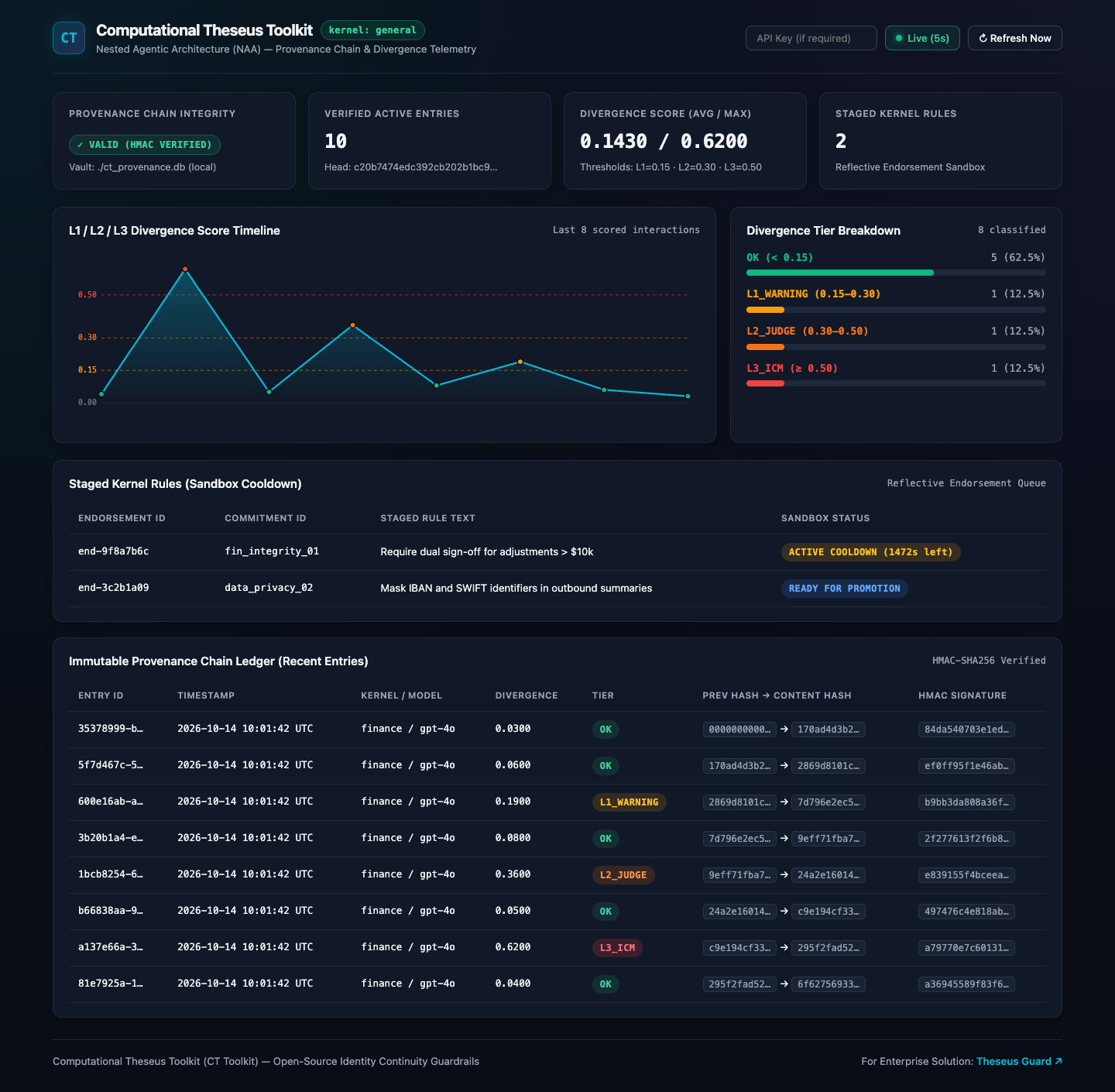
The CT Toolkit CLI (ct-toolkit) provides both a Rich terminal interface and an Interactive Web Audit & Telemetry Dashboard (--web) for inspecting cryptographic provenance logs, L1/L2/L3 divergence tiers, and running standalone endpoint audits without writing Python code.
Installation
Install CT Toolkit with the CLI and Server extras:
Verify the installation:
1. Interactive Web Audit & Telemetry Dashboard (dashboard --web)
Launch the modern web dashboard on localhost:
Open http://127.0.0.1:8001/dashboard in your browser.
Web UI Capabilities
- Live Auto-Refresh: Polls
/api/dashboard/statusevery 5 seconds with a one-click pause/resume toggle. - Cryptographic Chain Status: Real-time HMAC-SHA256 verification badge (
VALIDvs.TAMPERED), verified entry counter, average/max divergence score meter, and active staged cooldown counter. - Divergence Tier Breakdown: Visual stacked bar and proportional breakdown of
OK,L1_WARNING,L2_JUDGE, andL3_ICMtiers. - Interactive Log Explorer: Filter provenance records by tier (
All,OK,L1,L2,L3) and click any row to inspect full request/response SHA-256 hashes, previous entry hashes, and JSON metadata.
Localhost-First Security Architecture
- Bound to
127.0.0.1by Default: Only accessible from your local machine unless explicitly configured otherwise. - Fail-Closed Non-Loopback Protection: Binding to
0.0.0.0or a non-loopback IP without--api-key(orCT_SERVER_API_KEY) is rejected at startup (ValueError). Non-loopback client requests are rejected with403 Forbiddenwhen no API key is set. - Credential & Path Redaction: Database passwords in
--vault-urlare masked (***) and local filesystem paths are reduced to basenames (ct_provenance.db).
2. Terminal Telemetry (ct-toolkit status / dashboard)
To inspect your provenance chain directly inside the terminal:
# Local SQLite vault
ct-toolkit status --vault ./ct_provenance.db --limit 10

# Enterprise PostgreSQL / SQLAlchemy vault
ct-toolkit status --vault-url "postgresql+psycopg2://user:pass@localhost:5432/ct_audit"
$ ct-toolkit status

  _______ _    _ ______  _____ ______ _    _  _____    _____ _    _          _____  _____
 |__   __| |  | |  ____|/ ____|  ____| |  | |/ ____|  / ____| |  | |   /\   |  __ \|  __ \
    | |  | |__| | |__  | (___ | |__  | |  | | (___   | |  __| |  | |  /  \  | |__) | |  | |
    | |  |  __  |  __|  \___ \|  __| | |  | |\___ \  | | |_ | |  | | / /\ \ |  _  /| |  | |
    | |  | |  | | |____ ____) | |____| |__| |____) | | |__| | |__| |/ ____ \| | \ \| |__| |
    |_|  |_|  |_|______|_____/|______|_____/|_____/   \_____|\____//_/    \_\_|  \_\_____/

  Computational Theseus Toolkit (CT Toolkit) v0.4.1
  Identity Continuity Guardrails for Agentic Systems

╭──────────────────── CT Toolkit Audit & Telemetry Status ─────────────────────╮
│ Vault: ./ct_provenance.db (local)                                            │
│ Chain Integrity: VALID (HMAC Verified)                                       │
│ Verified Active Entries: 4 (showing last 4)                                  │
│ Divergence Score (Avg / Max): 0.1525 / 0.3800                                │
│ Head Hash: 9c64cb51a479c52c207b7fa8c3197a75...                               │
╰──────────────────────────────────────────────────────────────────────────────╯
3. Standalone Endpoint Auditor (ct-toolkit audit)
Run an L3 Identity Consistency Metric (ICM) audit against any LLM provider.
Usage:
Options:
--url: The base URL of the LLM provider (e.g.,http://localhost:11434/v1for Ollama).--kernel: Name of the Constitutional Kernel to use (default:general).--template: Identity template for embedding comparison (default:general).--model: Specific model name to request (default is provider-dependent, e.g.gpt-4o-minifor OpenAI).
Example: Auditing a local Ollama model
4. Other CLI Commands
serve
Start a FastAPI guardrail and dashboard server implementing the LiteLLM Generic Guardrail API (/v1/analyze) and Web Dashboard (/dashboard):
list-kernels & list-templates
List all available Constitutional Kernels and Identity Templates:
setup
Download a SHA-256 verified profile from the official repository:
Troubleshooting
- Connection Error: Ensure your LLM provider (Ollama, LM Studio, etc.) is running and accessible at the provided URL.
- Kernel Not Found: Use
ct-toolkit list-kernelsto verify you are using a valid kernel name. - Non-Loopback Bind Error: Always supply
--api-keyor setCT_SERVER_API_KEYif bindingserveordashboard --webto a non-loopback address (0.0.0.0).